Reverse Posted Accruals
Business Central does not allow reversing an arbitrary installment. If the last posted installment was number 7, the reversal must start from it. It is not possible, for example, to reverse installment number 4, because installments 5, 6, and 7 have already been posted. If you attempt to reverse an installment out of order, the system displays an error.
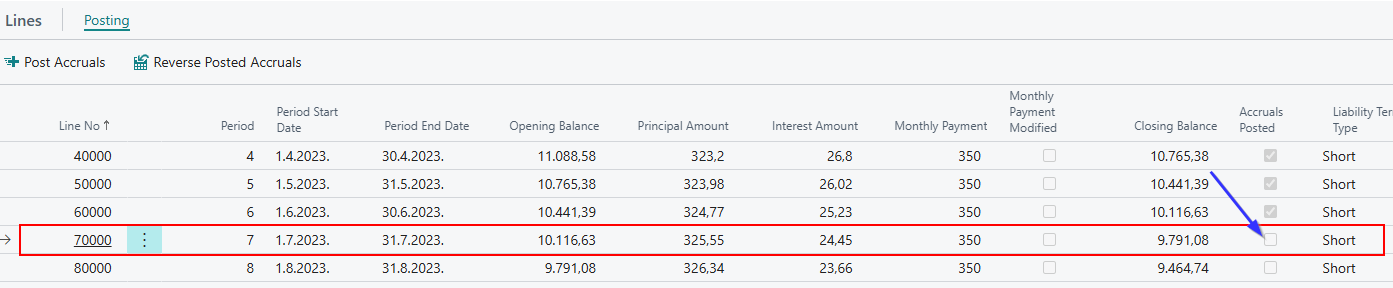
Reversing an installment is initiated using the Reverse Posted Accruals action. Select the line you want to reverse and run the action. A prompt appears, for example: Do you want to reverse Posted Accruals for contract UGIFRS0-044, schedule UGIFRS0-044-03, period 7?
Schedule Update
On the schedule, for the line that has been reversed, the Accruals Posted checkbox is unmarked.
General Ledger Actions
In the General Ledger entries, Business Central automatically performs two actions:
- It reverses the related entries (because they were previously closed) and reverses the exchange rate differences that occurred when posting the installment from the schedule.
- It creates a reversal journal and automatically posts it.
You can see that the installment has been reversed (principal, interest, and lease cost), as well as the reclassification from long-term to short-term liability. In this way, the last short-term installment is automatically returned to long-term on the schedule and in the Vendor Ledger Entries.
General Ledger Entries – Posting Reversal of a Monthly Installment
- Reversal of the installment and the long-term to short-term reclassification.
- Reversal of exchange rate differences.
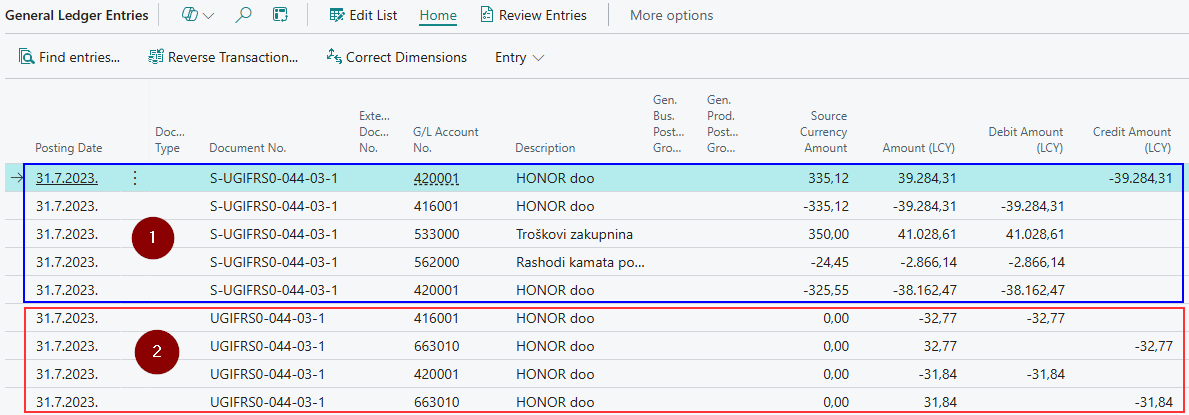
The journal created by the reversal has the letter "S" prefixed to the contract number, as shown in the Document No. field. This makes it clear that the journal was generated because of reversing an installment.
Need more help?